
From meme to morale patch: complete 2026 custom design workflow
Instead of repeatedly shrinking a meme until the punchline turns into unreadable mush, use a custom morale patch design process that moves from a clear joke to actual-size artwork, a production brief, and an approved proof. This 2026 workflow helps you design for a range bag or patch panel without treating a screenshot like manufacturing instructions.
- The custom morale patch design process starts with placement, readable artwork, and a manufacturer-confirmed production method.
- Stickthison morale patches suit gun owners who want parody and range-culture humor on their gear.
- Check PVC patch artwork at actual size before approving a production proof.
- Keep printed artwork and molded relief instructions separate; they describe different production decisions.
Why this matters
Stickthison morale patches are best for gun owners who want parody and range-culture humor on their gear. Browse Stickthison for finished designs, but keep shopping for an existing patch separate from arranging custom production. A finished product listing is not a custom manufacturing agreement.
A meme gets a whole screen. A patch gets whatever space remains between your bag handle and the collection of questionable decisions already attached to it. The joke needs to survive that downgrade.
Your 2026 design goal is simple: preserve the recognizable idea while removing everything that depends on zooming, tiny captions, or a lengthy explanation. A patch should not require a briefing from the guy who brought it.
Before you start
- Gather your materials: the artwork source, an editor you know how to use, a ruler, paper for a size mockup, and access to the intended mounting surface. Keep editable artwork, not just a flattened screenshot.
- Confirm production requirements: ask your chosen manufacturer about accepted files, dimensions, backing, color references, and proof approval. Establish who can approve changes before handing over artwork.
- Check the gotcha: printed detail and molded PVC relief are different things. Confirm the construction method before designing tiny lettering or raised features. Also confirm permission to use any borrowed artwork; calling something parody does not automatically settle rights questions.
No special account is part of this workflow. Use your existing editor, and follow its documented export controls rather than hunting for a mystery button someone invented in a tutorial.
Concept and placement brief
Define the joke before drawing the patch
- Write the punchline. Describe what someone should recognize without explaining the entire meme. If the explanation is longer than the caption, simplify the concept.
- Choose the placement. Decide whether the patch belongs on a range bag, backpack, hat, or display panel. Measure the usable area, not the entire item.
- Choose the outline. Sketch a shape that contains the artwork without leaving fragile-looking projections or empty space that serves no purpose.
- Record the intended dimensions. Specify width and height with units. Do not send a manufacturer “normal patch size” and hope telepathy is included.
- Separate essential from optional detail. Keep the feature that makes the joke recognizable. Move background scenery, extra captions, and decorative clutter into the discard pile.
Expected result: a written brief that identifies the joke, placement, outline, and intended dimensions before you spend time polishing artwork.
Use a paper outline against the actual bag or panel. Check whether the shape covers a seam, crowds a zipper, or occupies space you need for another patch. The perfect drawing is still the wrong patch if it fights your gear.
Use real patch dimensions as references, not universal rules
These finished Stickthison examples show why you should record complete dimensions and construction details. They are references, not instructions to copy their artwork or assume every patch uses the same process.
| Finished patch reference | Stated dimensions and construction | Best for | Useful lesson | Limitation |
|---|---|---|---|---|
| Not Having A Good Time Patch | 3 inches wide; thick, 3D PVC; hook/loop backing | Comparing a compact phrase-based patch reference | Width and backing belong in the design brief | The supplied specification gives width, not height |
| Get Off My Driveway Patch | 3 inches wide by 2 inches high; thick, 3D PVC; gloss UV printed finish | Comparing a rectangular printed-finish reference | Material and surface finish are separate specifications | Its printed finish does not establish what a molded-only design can reproduce |
Neither example establishes a universal minimum letter size, line thickness, or production tolerance. Get those requirements from the manufacturer handling your design. Your 2026 brief should describe your patch, not borrow assumptions from another product.
Artwork and construction plan
Build readable artwork at the intended size
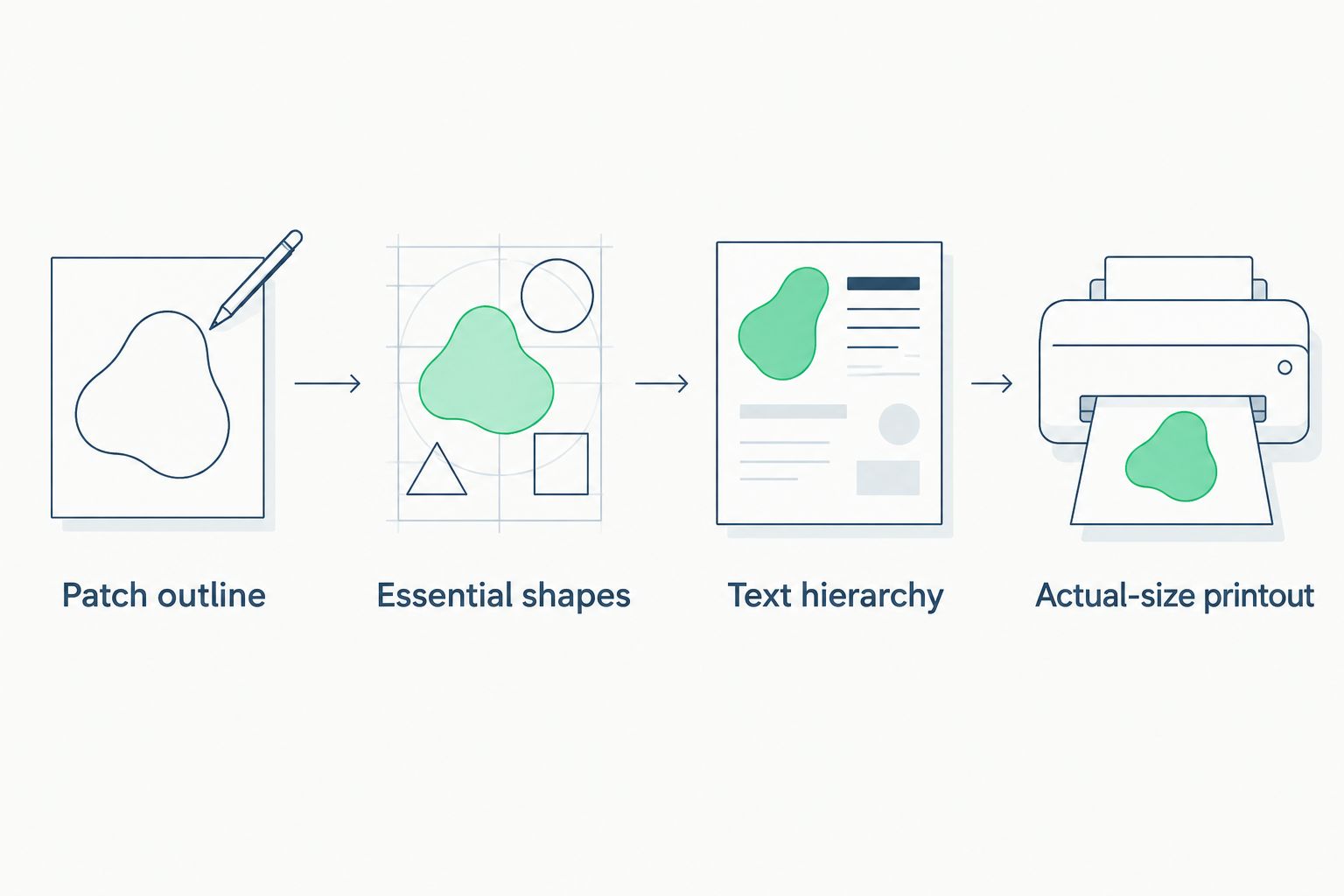
- Create the patch outline. Set the document to your intended dimensions using your editor’s documented controls. Keep the outline separate from the artwork.
- Rebuild the essential shapes. Use clean source artwork or redraw elements you have permission to use. Enlarging a low-resolution screenshot does not restore missing detail.
- Set the text hierarchy. Make the punchline the primary text. Remove secondary wording that becomes illegible at the intended size.
- Separate production information. Keep artwork, outline, color references, and any proposed raised areas distinguishable in the editable file.
- Make an actual-size printout. Check the print settings so the page does not automatically enlarge or shrink your design. Measure the printed outline with a ruler.
- Test recognition. Put the printout where the patch will sit and ask someone to read it without coaching. If you must narrate the joke, revise the artwork.
Expected result: artwork that you can read and recognize at its intended physical size, plus an editable source for revisions.
A black border does not rescue a paragraph. Increasing contrast helps distinguish elements, but it cannot make an overcrowded composition stop being overcrowded. Delete first; decorate later.
Choose the production method with the manufacturer
Do not use “PVC” as shorthand for every decision. The patch material, surface artwork, relief, and backing need separate answers.
| Production direction | Best for | Advantage | Trade-off to confirm |
|---|---|---|---|
| Molded relief artwork | Designs built around distinct shapes and raised features | You can specify a physical hierarchy of raised and recessed areas | Fine features must fit the manufacturer’s molding requirements |
| Printed surface artwork | Designs that depend on surface graphics | Printed detail is handled separately from molded relief | Confirm print capabilities, surface finish, and whether proposed relief is included |
Choose the process that supports the joke, not the process with the coolest description. If a facial expression carries the entire gag, ask how that expression will be reproduced before approving simplified artwork.
Keep your 2026 artwork notes explicit: mark proposed raised areas as proposed, identify printed elements, and ask the manufacturer to confirm what is feasible. A shaded drawing does not automatically specify physical depth.
Production handoff
Package the files and specifications
- Save the editable master. Preserve the version that contains editable text, separate artwork elements, and your outline.
- Export the requested production file. Use the format your manufacturer accepts. Do not assume a particular vector or image format is mandatory everywhere.
- Include a viewing reference. Supply a readable preview showing the intended appearance. Clearly distinguish the preview from the production file.
- Attach a written specification. Include dimensions, units, material, construction method, color references, backing, and intended placement.
- Identify unresolved decisions. Ask direct questions about line thickness, lettering, relief, outline changes, and attachment requirements. Get answers before approval.
- Name the revision clearly. Give the artwork and specification matching revision identifiers. Archive superseded versions outside the active handoff folder.
Expected result: a manufacturer can identify the current artwork, the intended finished patch, and every question that still needs an answer.
Specify the attachment system rather than simply writing “Velcro.” For a removable hook-backed patch, check that the destination has a compatible loop surface. Confirm whether a separate loop piece is needed and whether it is part of the agreed specification.
Do not assume a bag accepts patches because it looks tactical enough to own a podcast. Inspect the mounting area.
Keep feedback attached to the correct revision
Send consolidated corrections against the current proof. Identify the affected element and the requested change: replace the caption, enlarge the lettering, remove the background, or correct the outline.
“Make it pop” is not a correction. It is how you get another round of emails and a designer developing a nervous eye twitch.
For a shared range-group design, choose an approval owner. Collect comments before requesting a revision so the manufacturer does not receive conflicting instructions from everyone who has ever bought a chest rig.
Proof approval and physical checks
Approve the patch, not just the picture
- Match the proof to the brief. Verify dimensions, units, spelling, outline, construction, colors, and backing against the current specification.
- Review manufacturer changes. Ask what was altered for production. Look for removed details, widened lines, substituted colors, or repositioned text.
- Check the artwork at actual size again. Repeat the paper test using the revised design. The prettier proof is not automatically the more readable patch.
- Clarify what the proof demonstrates. A digital image can show layout, but it does not let you inspect physical texture or attachment performance. Ask about a physical sample when those decisions matter.
- Approve an identified revision. State which file and specification you approve. Do not approve a vague “latest version” when several attachments are circulating.
- Check the finished item against the approved specification. Inspect the lettering, dimensions, finish, backing, and fit on your intended mounting surface.
Expected result: an approval tied to an identifiable design and specification, followed by a physical check against that agreement.
For your 2026 project, keep the approved proof beside the final specification. Future-you should not need to reconstruct the entire conversation like an investigator examining the group chat.
Finished references for your design notes
Stickthison offers finished parody patches you can study when deciding what belongs in a specification. The compact phrase-based example and the rectangular printed-finish example below demonstrate different ways to describe a patch without pretending they establish your manufacturer’s limits.
Use them as references for material, dimensions, and finish. Do not reproduce their artwork.


When the meme changes: reuse the workflow
A caption variant can reuse an approved outline and placement brief. A new character silhouette, mounting surface, or construction method needs those decisions checked again.
- Duplicate the master: preserve the approved version before changing anything.
- Replace the joke: update text or imagery without accidentally carrying over obsolete notes.
- Repeat the size test: new wording changes spacing, even when the outer dimensions stay identical.
- Request a new proof: identify the changed elements and confirm whether production requirements have changed.
This variant is best for a range-group series with a consistent footprint. Its advantage is a reusable brief; its drawback is that a fixed outline can force a new joke into the wrong shape. Change the outline when the artwork needs it.
Troubleshooting
- The text disappears at actual size. Shorten the caption, enlarge the lettering, and remove competing details. Repeat the printout test before requesting another proof.
- The manufacturer changes important shapes. Ask which production constraint caused the change. Revise the artwork or discuss another construction method rather than insisting the screenshot is sacred.
- The printed dimensions are wrong. Check automatic page scaling and measure the outline. A correctly sized document does not guarantee a correctly sized printout.
- The patch will not attach to your gear. Compare the specified backing with the actual mounting surface. Resolve the attachment requirement before approving another version.
- Someone approves an outdated file. Stop the handoff and identify the current revision in writing. Replace ambiguous attachments with a clearly named artwork-and-specification pair.
Customize your workflow
Build a reusable brief with fields for joke, placement, dimensions, outline, material, construction, colors, backing, and approval owner. Keep manufacturer-specific requirements alongside it rather than treating them as universal design rules.
For a coordinated collection, reuse the design language instead of squeezing identical artwork onto everything. A hat, bag panel, and sticker surface impose different constraints. Keep the punchline; redraw the layout when the destination demands it.
FAQ
What is the custom morale patch design process?
The custom morale patch design process moves from a concept and placement brief to actual-size artwork, manufacturer-confirmed specifications, a production proof, and final inspection. Confirm the construction method before treating artwork as production-ready.
Can I turn a meme screenshot into a PVC morale patch?
A screenshot can serve as a concept reference, but it is not automatically production-ready artwork. Confirm usage rights, simplify the design, and provide files that meet your manufacturer’s requirements.
What size should my custom morale patch be?
Size your custom morale patch to its intended mounting surface and readable artwork. Measure the usable panel, specify width and height with units, and test a paper outline on the actual gear.
Is printed PVC better than molded relief for a meme patch?
Printed artwork and molded relief solve different design problems. Choose with your manufacturer based on whether the joke depends on surface graphics, raised shapes, or a confirmed combination of both.
What files do I need for custom patch production?
Provide the production format your manufacturer requests, an editable master, a viewing reference, and a written specification. Accepted formats and production limits are manufacturer-specific.
Does a parody patch automatically avoid copyright problems?
No, calling a design parody does not automatically resolve copyright or trademark questions. Confirm your rights to borrowed artwork and seek qualified legal advice when the proposed design raises a rights issue.
Does Stickthison offer custom patch manufacturing through this guide?
This guide describes a design workflow, not a Stickthison custom manufacturing offer. Treat finished product listings separately from any custom-production agreement.
How do I approve a morale patch proof without missing something?
Compare the identified proof revision with your written specification for dimensions, spelling, outline, construction, colors, and backing. Repeat the actual-size readability check and clarify any manufacturer changes before approving.
One last thing
The paper mockup is where a bad patch should fail. Tape the outline to the intended bag or panel and try to read it without picking it up. If the joke needs a zoom gesture, it still belongs on your phone.


Comments