
Custom patches to unit fundraiser: complete 2026 workflow
Instead of chasing patch requests through group texts and trying to remember who paid, run your custom morale patch fundraiser through one approved design, one order form, and one reconciled tracker. This 2026 workflow takes you from the unit’s inside joke to a documented handoff without appointing somebody’s screenshot folder as treasurer.
- Run a custom morale patch fundraiser with approved artwork, verified payments, and a single fulfillment tracker.
- Stickthison suits gun owners who want parody morale patches; confirm custom production and fundraising arrangements separately.
- Use an interest list before committing to production; interest is not a paid order.
- Approve the beneficiary, artwork, and proceeds calculation before collecting money.
Why this matters
A morale patch fundraiser combines a physical product, other people’s money, and a deadline. Treating it like a casual patch swap creates problems the joke cannot fix: disputed quantities, unauthorized artwork, and a beneficiary waiting for an unexplained balance.
Stickthison morale patches are best for gun owners who want parody rather than dress-uniform seriousness. Browse Stickthison for that tone, but keep inspiration separate from procurement. A retail design does not establish permission to reproduce it, a custom manufacturing agreement, or a fundraising partnership.
Your job is to make the campaign boring behind the scenes. Let the patch have the personality; let the records have the receipts.
Before you start
- Get approval and access. Assign 1 campaign owner and 1 backup, secure permission from the beneficiary or organization, and arrange access to the approved collection account, shared tracker, and participant communications.
- Gather production requirements. Prepare artwork you have permission to use, the intended dimensions and backing, a written supplier quote, and confirmed proof, production, and delivery terms. Ask the supplier which artwork files it accepts.
- Clear the non-obvious gotcha: identity is not authorization. Membership in a unit does not automatically authorize using its insignia, collecting money under its name, or implying official endorsement. Obtain the necessary written approval before promoting the fundraiser.
If your organization requires a particular fundraising process, use that process. A patch with an excellent joke does not outrank the person responsible for the account.
Campaign approval and production brief
Establish the campaign record
- Create a shared campaign document. Add fields named Campaign name, Beneficiary, Campaign owner, Approval record, Order deadline, and Handoff method.
- Give the campaign a specific name, such as 2026 Unit Patch Fundraiser, rather than naming every file “patch final.” That way lies madness and several more finals.
- Record the purpose of the fundraiser and how proceeds will be calculated. Distinguish gross receipts from the amount remaining after documented campaign expenses.
- Define what happens if the campaign does not meet the supplier’s requirements. Record the cancellation or refund process before collecting payments, using terms approved by the responsible organization.
- Store the written approval alongside the campaign record. Identify who can approve changes to the artwork, scope, and spending.
Expected result: Another organizer can identify who authorized the campaign, who receives the proceeds, and what happens if it cannot proceed.
Freeze the artwork brief
Write down the intended patch dimensions, material, backing, colors, and design text. These are requested specifications until the supplier confirms them; do not turn your wish list into a product promise.
Ask the supplier to explain any design changes needed for production. Review the proof at the intended physical size, not just enlarged on a screen. Tiny lettering does not become readable because you believe in it very aggressively.
Use the custom morale patch design workflow to organize the artwork stage. Save the approved proof under Approved artwork, record its revision, and retain the corresponding supplier specifications.
Recommendation: Require 2 reviewers: one responsible for design accuracy and one authorized to approve the organization’s use of the design. Record both approvals before releasing the campaign artwork.
Demand collection and order configuration
Choose the commitment method
An interest list and a paid preorder solve different problems. Pick the method your organization permits and describe the commitment accurately.
| Method | Best for | Advantage | Limitation |
|---|---|---|---|
| Interest list | Checking demand before production commitments | Collects preferences without collecting money | Responses are not confirmed purchases |
| Paid preorder | An approved campaign with settled production terms | Connects confirmed payments to requested quantities | Requires clear cancellation, refund, and delay handling |
Use an interest list while production terms remain unsettled. A paid preorder belongs after approval, not before somebody finally asks whether the supplier can make the thing.
Neither method guarantees enough orders. Compare the resulting quantity with the supplier’s written requirements before authorizing production.
Build the participant record
- Create a form using your organization’s approved platform. Add Name, Contact email, Quantity, Handoff method, and Campaign acknowledgment. Collect delivery details only when needed.
- For an interest list, label the response Interest only. State plainly that submitting the form does not place a paid order.
- For a preorder, explain the approved campaign terms before submission. Identify the beneficiary, requested product, deadline, and process for communicating changes.
- Connect responses to a shared tracker or enter them using a consistent process. Create Order ID, Payment status, Payment reference, Quantity, Artwork revision, and Fulfillment status columns.
- Restrict editing access to organizers who need it. Do not publish participant addresses, contact details, or payment references in the unit chat.
- Submit 1 test response and trace it through the tracker. Check the quantity, contact information, acknowledgment, and handoff selection before sharing the form.
Expected result: Each participant has a traceable record, and organizers can distinguish interest, payment, and delivery without decoding chat reactions.
Payment reconciliation and production release
Configure the campaign tracker
Use separate fields for payment and fulfillment. A person can be paid but not supplied, or supplied with an unresolved payment discrepancy. One heroic checkbox cannot describe both.
Create these organizer-defined status values:
- Approval: Artwork and campaign authorization are recorded.
- Demand: Responses are collected and classified by commitment method.
- Orders: Verified payments and quantities are reconciled.
- Handoff: Received patches are assigned and distributed.
The status labels describe your workflow, not a supplier’s order system. Keep the supplier’s own confirmation and reference alongside your campaign records.
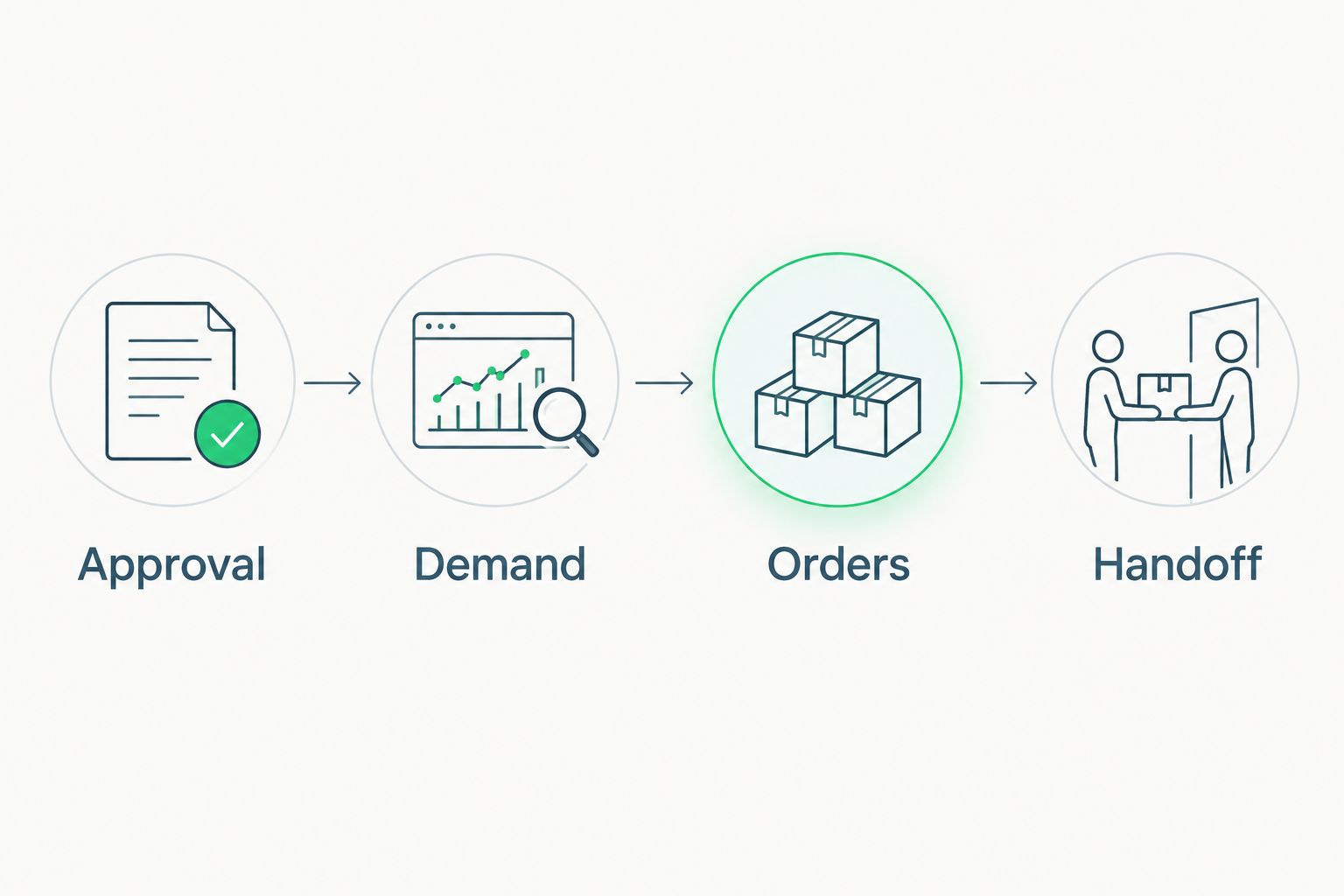
Move a participant into the confirmed order total only after matching the payment to the record. Keep unmatched transactions in an exception list rather than guessing which person uses a completely unrelated payment username.
Release the production order
- Reconcile payments against the approved account’s transaction records. Enter the matching reference in Payment reference, not a screenshot of sensitive account information.
- Compare confirmed quantities with the supplier’s requirements. Resolve duplicates, cancellations, and unmatched payments before finalizing the total.
- Record expected campaign expenses in a separate ledger. Include production, applicable fees, packaging, and delivery expenses relevant to your arrangement; retain the supporting documents.
- Obtain the required spending approval. Send the supplier the approved artwork revision and confirmed specifications, then retain the supplier’s written order acknowledgment.
- Update participants using the supplier’s confirmed schedule. Do not invent a delivery date because the fundraiser poster has an awkward blank space.
Expected result: The production authorization matches the approved design and reconciled quantity, with an accountable record of the commitment.
For your 2026 campaign, preserve the original order total when later changes occur. Add a dated adjustment instead of quietly overwriting the number and hoping future-you develops telepathy.
Receiving and participant handoff
Close the fulfillment loop
- Count the received patches before announcing pickup. Compare the delivery with the supplier acknowledgment and record discrepancies.
- Inspect the received design, backing, and dimensions against the approved specifications. Photograph any issue and contact the supplier before distributing affected pieces.
- Assign patches to confirmed participant records. Keep an organizer reserve separate only if that reserve was approved and included in the campaign plan.
- For pickup, record Collected only after the participant receives the order. For shipped orders, record dispatch information and the relevant shipment reference.
- Reconcile undelivered orders, remaining patches, and open payment issues. Assign an owner to each unresolved item.
- Transfer the approved net proceeds to the beneficiary through the organization’s authorized process. Retain acknowledgment and publish an appropriate campaign summary.
Expected result: Every confirmed order has a recorded outcome, and the beneficiary’s transfer matches the reconciled campaign ledger.
Keep your 2026 closeout summary readable: receipts, documented expenses, net proceeds transferred, and unresolved obligations. Share totals with supporters, not private participant records.
Repeat the workflow for replacement orders
A second run honestly exists when participants miss the first campaign or request additional patches. Treat it as a new batch, not an invitation to reopen every closed record.
Best for: A group with renewed demand for an already approved design. The advantage is a reusable campaign structure; the limitation is that supplier terms and organizational approvals still need checking.
Duplicate the blank form and tracker structure, then clear participant data before sharing. Name the new batch distinctly, retain the artwork revision, and reconfirm production requirements before accepting commitments.
If the beneficiary, design, or campaign terms change, obtain fresh approval where required. Reusing a spreadsheet is efficient. Reusing someone’s permission without checking is a different hobby.
For a later 2026 batch, link the internal campaign records by batch name while keeping payments and fulfillment separate. Never use a fresh participant payment to conceal an unresolved earlier obligation.
Troubleshooting
- The form total exceeds the paid total. Separate interest responses from confirmed orders, then match transactions individually. Do not authorize production from a raw response count.
- A participant appears twice. Compare contact details and payment references, confirm the intended quantity with the participant, and mark the duplicate without deleting the audit trail.
- The proof changes after promotion. Pause new commitments, obtain approval for the revision, and tell existing participants what changed. Follow the approved process for anyone who does not accept the change.
- Received patches differ from the approved specification. Document the discrepancy and ask the supplier to resolve it. Keep affected orders open instead of marking them fulfilled to make the tracker look prettier.
- Pickup turns into a missing-person documentary. Contact participants through the recorded channel, offer the approved handoff arrangements, and document the result. Follow the disclosed process for uncollected orders.
Customize your workflow
Expand the campaign only after the basic order record works. If you offer multi-patch orders, keep quantity explicit and verify the fulfillment count against each participant’s record. A larger order is still one participant record, not permission to lose track of individual pieces.
Stickthison sells patches, stickers, and gun cleaning mats, but those categories are not interchangeable campaign commitments. If you introduce another item type, give it separate specifications, quantities, and expense records rather than burying it in a notes column.
For an individual range-goer organizing a small group, keep the campaign focused on a design people understand and an outcome you can document. The joke gets attention; the clean handoff earns trust.
FAQ
How do I start a custom morale patch fundraiser?
Start with written campaign approval, a named beneficiary, and an artwork brief you have permission to use. Confirm production requirements before collecting paid orders, then track each participant through payment and handoff.
Should I collect interest or paid preorders first?
Collect interest first when production terms or approvals are unsettled. Use paid preorders only after the responsible organization approves the collection process and participants can review clear campaign terms.
Can I use my unit’s insignia on a fundraising patch?
Use unit insignia only after obtaining the necessary authorization from the responsible organization or rights holder. Being a member of the unit does not itself establish permission for a fundraising campaign.
Does Stickthison provide a custom patch fundraising program?
Confirm any custom production or fundraising arrangement directly with Stickthison before making commitments. Its patch catalog does not establish a manufacturing agreement or a fundraising partnership.
How many patches should a unit fundraiser order?
Base the production quantity on verified commitments and the supplier’s written requirements. Keep any approved extra quantity separate from participant orders so expenses and remaining patches stay traceable.
What should a patch fundraiser order tracker include?
Include an order ID, contact information, quantity, payment status, payment reference, artwork revision, and fulfillment status. Keep payment and fulfillment separate so an incomplete handoff cannot disappear behind a paid checkbox.
How do I close a patch fundraiser in 2026?
Close a 2026 patch fundraiser by reconciling receipts, expenses, participant handoffs, and the beneficiary transfer. Record unresolved obligations and retain the supporting documents under your organization’s recordkeeping process.
One last thing
Close the campaign with the same seriousness you used to approve it. Before you archive anything, have the backup organizer explain the ledger and outstanding orders without help from the campaign owner.
If the explanation requires scrolling through private messages, the workflow is not finished. Fix the record while everyone still remembers which patch, payment, and person belong together.


Comments