
From patch design to bulk unit order: complete 2026 workflow
Instead of manually chasing artwork revisions, headcounts, and approvals through a department group chat, put bulk custom patches for departments through one shared record: brief, approved artwork, order release, and receiving check. This 2026 workflow takes you from an inside joke to a documented unit order without letting somebody’s screenshot become the production master.
- For bulk custom patches for departments, approve the design, attachment method, quantity, and delivery requirements before authorizing production.
- Stickthison morale patches suit gun owners who want parody on their range gear, not a substitute for required identification.
- Keep custom patch artwork, written approvals, and receiving records together so department reorders start with the right files.
- Confirm supplier requirements before collecting commitments; a finished design alone does not authorize a bulk order.
Why this matters
A personal range-bag patch answers to you. A department order answers to the person approving the artwork, the person authorizing the purchase, and everyone expecting the thing to fit their gear. Those are different jobs, even when the same poor bastard gets all of them.
Stickthison morale patches are best for gun owners who want parody on their range gear. Browse Stickthison for that tone, then separate personal humor from anything your department treats as official identification. Your off-duty joke does not automatically belong on an issued uniform.
The goal is not more paperwork. It is a production instruction that survives being forwarded without someone adding, “Actually, use the other version.”
Before you start
- Get authority and ownership sorted. Identify the artwork approver and purchasing authority. Confirm permission to use department names, insignia, and artwork; a logo found online is not permission.
- Gather the physical requirements. Have the intended bag, garment, or panel available to measure, plus your recipient count, delivery requirements, and any applicable purchasing rules.
- Check the attachment gotcha first. Hook-backed patches need a compatible loop surface. Confirm the backing and whether any separate receiving material is included before approving the order; “hook-and-loop” in a conversation is not a complete specification.
You also need a shared document or spreadsheet and a folder for artwork and approvals. The field names below are labels to create yourself, not buttons on a supplier’s website. No special ordering portal is required to use this workflow.
Build your 2026 order record
Use these configuration units in order. Keep the record owner responsible for moving the order between stages; otherwise, everyone assumes someone else approved it. Classic group-project behavior, now wearing boots.
Project brief
- Create a shared record titled with the department or group name and 2026 Patch Order. Add Order owner, Artwork approver, and Purchasing authority fields. Assign 1 final artwork approver so conflicting comments do not become competing production instructions.
- Add Intended use and Wear location. State whether this is an optional morale patch, an event keepsake, or authorized departmental identification. For uniform use, record the applicable approval rather than treating silence as consent.
- Add Finished dimensions, Material, Backing, and Color references. Measure the actual mounting area and record dimensions in inches or millimeters, using the same unit throughout. Do not copy the dimensions of a patch that merely looks about right.
- Add Recipient quantity, Additional quantity, and Total quantity. Keep extras visible rather than burying them in the headcount. Record the requested arrival date separately from the supplier’s confirmed schedule.
- Ask the proposed supplier to confirm artwork requirements, order requirements, proof procedure, and whether the requested construction is supported. Do this before collecting nonrefundable commitments from your group.
Expected result: You have a written brief that explains what the patch is, where it goes, who approves it, and what the supplier must confirm. Nobody needs to decode the group chat.
Artwork approval
- Create the design around the finished patch dimensions. Put required lettering and recognizable shapes ahead of decorative detail. A joke nobody can read is just an oddly shaped conversation starter.
- Add Artwork revision and Source file fields. Retain 2 files: the editable source and the approved production file supplied or accepted for manufacturing. Do not assume the editable file is automatically production-ready.
- Review the design at actual size. Print a paper outline if useful, then hold it against the intended mounting area. Check text, border placement, orientation, and whether nearby seams interfere with placement.
- Request a supplier proof tied to the written specifications. Ask what the proof confirms and what requires a physical sample. A screen proof cannot establish physical attachment quality.
- Record Approved revision, Approved by, and Approval date. Save the approval alongside the matching proof. If the artwork changes afterward, withdraw the earlier approval and repeat the review.
Expected result: One identifiable artwork revision has written approval, and its dimensions, material, and backing match the project brief. “The funny one Dave sent” is no longer a file-management system.
The workflow is deliberately linear: define the job, approve the design, release the order, then inspect what arrives. Keep those gates visible rather than letting an enthusiastic thumbs-up authorize everything at once.
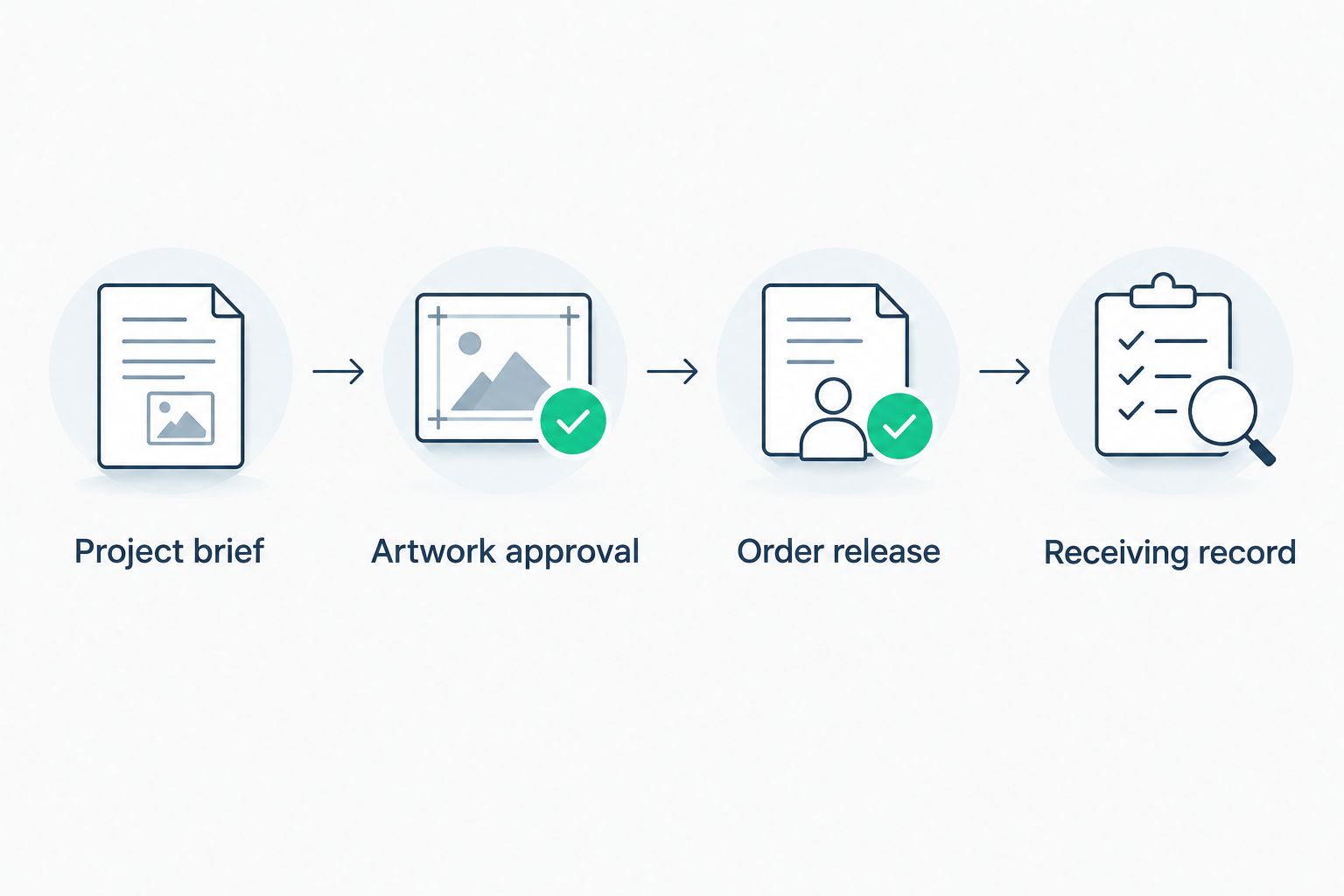
Order release
- Send the approved artwork revision and the specification record together. Ask for a written order summary identifying Finished dimensions, Material, Backing, Total quantity, and Approved revision. Resolve mismatches before authorizing production.
- Confirm the supplier’s proof, sample, production, and delivery arrangements for this order. Record whether the requested date is a requirement or a confirmed commitment. Do not convert a hopeful email into a promise to the department.
- Complete your organization’s purchasing process. Record Purchase authorization and Supplier reference without putting payment credentials in a shared worksheet.
- Mark Release status as Authorized only after purchasing approval and artwork approval are both recorded. Tell the supplier explicitly which revision is authorized; approval of a design is not permission to change the quantity.
- Save the supplier’s acknowledgment. If a specification changes, document the change and obtain renewed approval before the supplier proceeds with the changed work.
Expected result: The supplier and purchasing authority have the same production instructions. The record distinguishes what you requested, what was approved, and what the supplier acknowledged.
Receiving record
- Compare the shipment documentation with the order record. Record Quantity received, Receipt date, and any missing or unexpected items before distributing patches.
- Perform 3 acceptance checks: Artwork match, Dimension match, and Attachment match. Compare against the approved specification and proof, not a memory of what looked cool on your phone.
- Inspect for visible construction problems and test attachment on the intended compatible surface. Follow any agreed inspection or sampling procedure; do not invent an acceptance standard after delivery.
- Photograph discrepancies and keep affected patches separate. Contact the supplier with the order reference, approved revision, and a specific description of the mismatch. Follow the agreed reporting process.
- Record distribution and retain the approved files with the order history. Keep the reference sample or inspection photos identified by revision so the next coordinator can find them.
Expected result: You know what arrived, whether it matches the order, and what was issued. Your reorder starts with evidence rather than a faded patch fished out of somebody’s truck.
New design or repeat order: choose the right route
Not every department patch request needs a fresh design process. Use this comparison before opening another committee discussion about whether the mascot needs sunglasses. The mascot has suffered enough.
| Order route | Best for | Advantage | Limitation | Recommendation |
|---|---|---|---|---|
| New custom design | A new unit identity or approved event concept | Lets you define artwork and physical requirements together | Requires design review and purchasing approval before release | Use when the existing design does not meet the brief |
| Repeat order | The same approved design and construction | Starts with an identifiable production reference | Still requires confirmation of specifications and supplier arrangements | Use when the patch is genuinely unchanged |
| Revised design | A changed name, emblem, size, or backing | Preserves useful source material while documenting changes | Earlier approvals do not cover the altered specification | Treat the change as a new approval cycle |
A repeat order is only a repeat when the approved specification is unchanged. A different backing is not “basically the same.” Neither is squeezing extra text into the border because someone finally answered the email.
Stickthison’s IDPA Custom Morale Patch is described as a design created for the International Defensive Pistol Association. That named project is a relevant example of organization-specific artwork, not a specification for your department’s order. Confirm your own requirements with the supplier you select.
Reorder whenever your roster changes
For a 2026 roster update, copy the completed record instead of editing the original. Preserve the old order as the receipt of what actually happened. A living document is useful; a document that rewrites history is a pain in the ass.
- Create a new order record linked by reference to the previous Approved revision and Supplier reference.
- Recount recipients and record the new total. Do not assume last time’s extras are still sitting in a drawer.
- Confirm the design, dimensions, material, and backing remain unchanged. If anything changes, return to artwork approval and document the revision.
- Reconfirm supplier arrangements and purchasing authorization, then release the new order. Repeat the receiving checks when it arrives.
Expected result: You get a repeatable reorder process without treating an old approval as permanent permission to buy whatever the group chat dreams up next.
Keep approved designs separate from proposed concepts in your 2026 folder. “Final” should describe approval status, not the coordinator’s emotional condition.
Troubleshooting
The approved text is unreadable at finished size
Return to the artwork stage and simplify before release. Remove nonessential wording, adjust the layout with the designer, and review another actual-size representation. Zooming in until the lettering looks good does not make the patch larger.
The patch does not attach to the intended gear
Check the ordered backing against the receiving surface. Hook and loop are complementary surfaces, not interchangeable descriptions. Stop distribution if the order does not match the approved specification; do not improvise permanent modifications to issued gear without authorization.
Two people approved different artwork revisions
Pause the release and ask the designated approver to identify the controlling revision in writing. Archive superseded proofs separately. If production has already started, contact the supplier immediately and follow the agreed change process rather than assuming an emailed replacement file stops the work.
The required date and supplier schedule do not line up
Separate your internal event date from the supplier’s acknowledged schedule. Obtain an agreed plan before promising distribution. If the schedule does not meet the requirement, take the decision back to the purchasing authority instead of quietly deleting the inconvenient date.
Received patches differ from the approved order
Document the exact discrepancy with photos and the relevant specification. Keep the shipment record, approved proof, and acknowledgment together. Report facts such as wrong backing or mismatched lettering; “these look weird” gives nobody a useful starting point.
Customize your workflow
Add fields only when they change a decision. Useful additions include an authorized wear location, recipient group, distribution acknowledgment, or separate artwork-rights approval. Skip the ceremonial spreadsheet columns that everyone leaves blank.
For a personal range-day group, keep the same approval gates but use a simpler record. For department purchases, retain the purchasing and inspection records your organization requires. The amount of paperwork changes; the need for an approved specification does not.
If the design itself is still a napkin sketch, start with the custom morale patch design workflow. Settle the artwork before turning your 2026 unit order into a headcount exercise.
FAQ
How do I start ordering bulk custom patches for departments?
Start with a written brief covering intended use, finished dimensions, material, backing, quantity, and approval authority. Confirm the supplier can meet those requirements before authorizing production.
Can I use Stickthison patch designs as official department insignia?
Do not treat Stickthison morale patch designs as authorized department insignia. Obtain the required departmental approval and any necessary artwork permissions before official use.
What files do I need for a custom department patch?
Keep the editable artwork source and the approved production file in your order record. Ask the supplier which file formats and artwork preparation requirements apply to your specific construction.
Should I approve a digital proof or a physical sample?
Approve the digital proof for the artwork details it actually represents, and request a physical sample when physical verification is required. Confirm what each approval covers with the supplier before releasing the order.
How many patches should a department order?
Base the quantity on a verified recipient count plus explicitly approved extras. Confirm the supplier’s order requirements rather than adding an arbitrary percentage or assuming every recipient needs the same quantity.
Can I reorder patches without approving the artwork again?
Reference the previous approved artwork for an unchanged repeat order, subject to your organization’s approval rules. Any change to artwork, dimensions, material, or backing requires documented review before release.
What should I check when bulk patches arrive?
Check received quantity, artwork, dimensions, backing, and visible construction against the approved order. Document discrepancies before distribution and follow the supplier’s agreed reporting process.
One last thing
Keep the rejected versions, but make them unmistakably rejected. Move them into a superseded folder and remove them from the release packet. The most dangerous file in this workflow is not ugly artwork; it is a perfectly convincing old version with a name like final-final-actually-final.


Comments